Skip to content
Formerly GPU Memory Profiler

See GPU memory before it breaks your training.

Stormlog gives PyTorch and TensorFlow teams real-time GPU memory visibility, leak detection, diagnostics, and exportable timelines across CLI, Python API, and Textual TUI workflows.

PyTorch and TensorFlowCLI + Python APITextual TUIJSON, CSV, and HTML exports
Stormlog overviewReal-time session playback

Framework coverage

Built for the way ML engineers actually debug memory.

Stormlog stays useful whether you start from a one-off CLI session, instrument a Python training loop, or hand teammates a TUI and exported artifacts for follow-up diagnosis.

PyTorchTensorFlowCLIPython APITextual TUIJSON exportCSV exportHTML reports

Built for ML workflows

Profile live training runs, investigate artifact captures, and iterate without switching between disconnected tools.

More than one interface

Use Stormlog from the command line, inside Python, or through the interactive TUI depending on how your team works.

Exportable evidence

Ship JSON, CSV, and HTML artifacts into debugging reviews, CI pipelines, or offline analysis without re-running experiments.

Why Stormlog

A product surface built around real debugging pressure.

The goal is not just to collect numbers. Stormlog helps teams see GPU memory as it shifts, isolate signals worth acting on, and move from guesswork to repeatable workflow.

Live visibility

Watch memory shift while training is still running.

Track allocation, peak usage, and reserved memory in one place instead of stitching together shell commands and printouts.

Real-time monitoring

Follow GPU allocation as it changes mid-epoch, not after the crash report lands.

Threshold alerts

Apply warning and critical limits so risky runs surface immediately instead of after hours of wasted compute.

Interactive TUI

Inspect platform info, live tracking, exports, and diagnostics without opening a browser.

Actionable diagnostics

Pinpoint growth patterns before they become OOM crashes.

Move from vague symptoms to concrete signals you can act on, including suspicious allocation growth and distributed anomalies.

Leak detection

Identify suspicious growth patterns and isolate where memory starts drifting run over run.

Artifact diagnostics

Load exported snapshots and compare them later to trace distributed or intermittent issues with context intact.

Timeline views

Generate timeline plots and HTML artifacts to show how memory behaved across the full workload.

Flexible workflows

Fit Stormlog into the stack you already have.

Adopt the profiler incrementally, from quick CLI sessions to deeper instrumentation in Python-heavy training code.

CLI automation

Start monitoring or diagnostics sessions from the terminal without reworking your whole training loop.

Python hooks

Use decorators, context managers, and programmatic sessions when you need tighter profiling control.

CPU-compatible workflows

Prepare and test profiling routines before moving them onto production GPU infrastructure.

Spot issues faster

Catch leaks, rank anomalies, and regressions before they waste compute.

Stormlog turns raw allocation data into signals your team can review. Load artifacts, compare suspicious runs, filter by anomaly reason, and export proof for later triage.

Anomaly signalsArtifact reloadsDistributed diagnosticsReview-ready exports

Investigate distributed runs with rank-aware diagnostics

Review artifacts from prior sessions without reproducing the entire failure

Move from symptoms to concrete next steps with exportable traces

Stormlog diagnostics view
Diagnostics workspace

Workflow

Instrument, observe, diagnose, export, optimize.

The page story stays cinematic, but the workflow is practical: integrate Stormlog, watch a run live, capture useful evidence, and apply fixes before the next training cycle wastes more GPU time.

1

Step 1

Instrument

Add Stormlog to the workload you care about, from lightweight decorators to deeper session-based profiling.

stormlog workflow
from stormlog import profile

@profile(track_tensors=True, detect_leaks=True)
def train_epoch(model, dataloader):
    for batch in dataloader:
        loss = model(batch)
        loss.backward()
2

Step 2

Observe

Launch the TUI or a CLI session to watch allocation, peak memory, and alerts while the training run is alive.

stormlog workflow
$ stormlog monitor --pid 12345
┌─ Live GPU Memory ──────────────────────┐
│ Allocated  16.2 / 24.5 GB              │
│ Peak       19.8 / 24.5 GB              │
│ Alerts     None                        │
└────────────────────────────────────────┘
3

Step 3

Diagnose

Inspect spikes, suspicious growth, and anomaly indicators before the next restart cycle begins.

stormlog workflow
[WARN] suspicious growth detected
tensor: grad_cache
change: +128MB over 50 iterations
signal: growth beyond threshold
4

Step 4

Export

Ship artifacts into CI, review threads, or follow-up debugging sessions instead of relying on memory alone.

stormlog workflow
$ stormlog export --format json --output run.json
$ stormlog export --format html --output run.html

✓ timeline written
✓ diagnostics artifact saved
5

Step 5

Optimize

Use the evidence to fix leaks, stabilize batch sizes, and avoid repeat OOM failures in future runs.

stormlog workflow
Before: OOM at batch_size=64
After: stable at batch_size=96
Memory savings: 2.1 GB (-26%)

✓ 50 epochs completed
✓ zero OOM interruptions

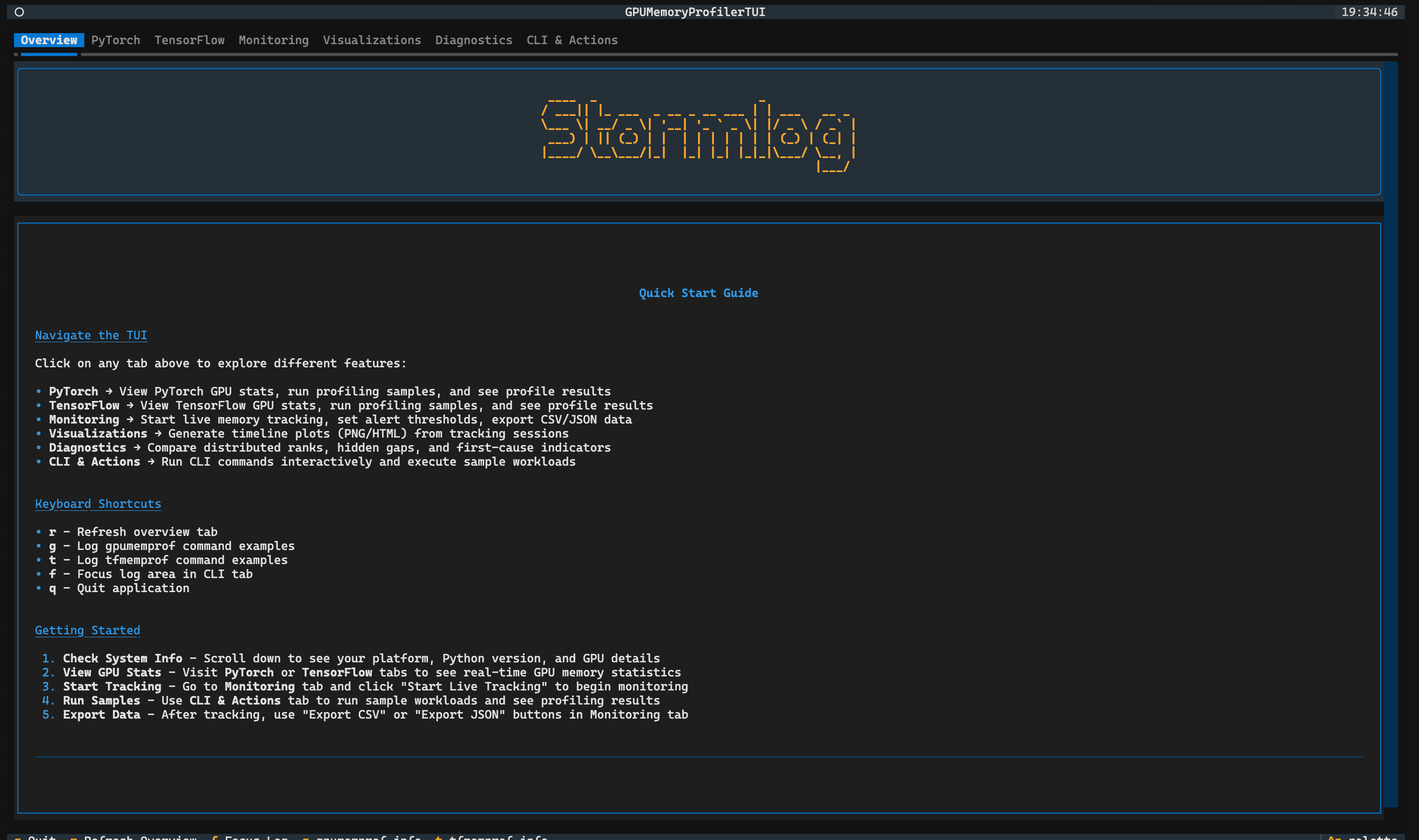
TUI showcase

A terminal-native workspace that still feels like a product.

The TUI is where Stormlog’s workflows become tangible: quick start guidance, monitoring controls, visualization exports, diagnostics, and CLI-driven actions in a single interface.

Active frame

Quick start

Overview

Orient new users with platform details, keyboard shortcuts, and a fast path into every Stormlog surface.

Overview

Proof of value

The difference between reactive debugging and instrumented visibility.

Stormlog is most useful when a run is already going sideways. Drag the divider to compare guesswork against a workflow with live monitoring, anomaly signals, and exported evidence.

With Stormlog

$ stormlog monitor --pid 12345

Allocated 16.2 / 24.5 GiB

Peak 19.8 / 24.5 GiB

✓ live alerts enabled

[WARN] suspicious growth detected

signal: grad_cache +128MB

reason: repeated growth over threshold

✓ export diagnostics artifact

After the fix

batch_size = 96 ✓ stable

memory saved = 2.1 GiB

zero OOM interruptions across 50 epochs

Without Stormlog

$ python train.py

Epoch 9/50... training

Epoch 10/50... training

RuntimeError: CUDA out of memory while allocating 2.4 GiB

$ nvidia-smi

| 23476 MiB / 24564 MiB |

Which tensor grew? Which step spiked? What changed since the last run?

Fallback strategy

batch_size = 64 → OOM

batch_size = 32 → unstable

batch_size = 16 → slow but survives

Open source proof

Credibility comes from the repo, the docs, and the people shipping it.

This landing page is intentionally not padded with generic testimonials. Stormlog’s proof is the public codebase, the published package, the documentation footprint, and the maintainers who keep the project moving.

Prince Agyei Tuffour

Prince Agyei Tuffour

Core Maintainer

@nanaagyei
Silas Asamoah

Silas Asamoah

Core Maintainer

@Silas-Asamoah
Derrick Dwamena

Derrick Dwamena

Core Maintainer

@dwamenad

Ready to debug with context?

Trace memory clearly, export evidence, and keep training runs stable.

Use the docs to get started, inspect the repository, or install the current PyPI package while the Stormlog rename rolls forward.